Turn Photo into Coloring Page

Sign up for 3 free coloring pages and download printable PNG, A4 or US Letter PDFs. No credit card needed.

Your photo
Line detail
Checking your free pages…

Your coloring page appears here

Upload a photo to make a clean, printable outline.

Downloads become available after conversion.

Photos are processed by KIE. Read our Privacy Policy for storage details.

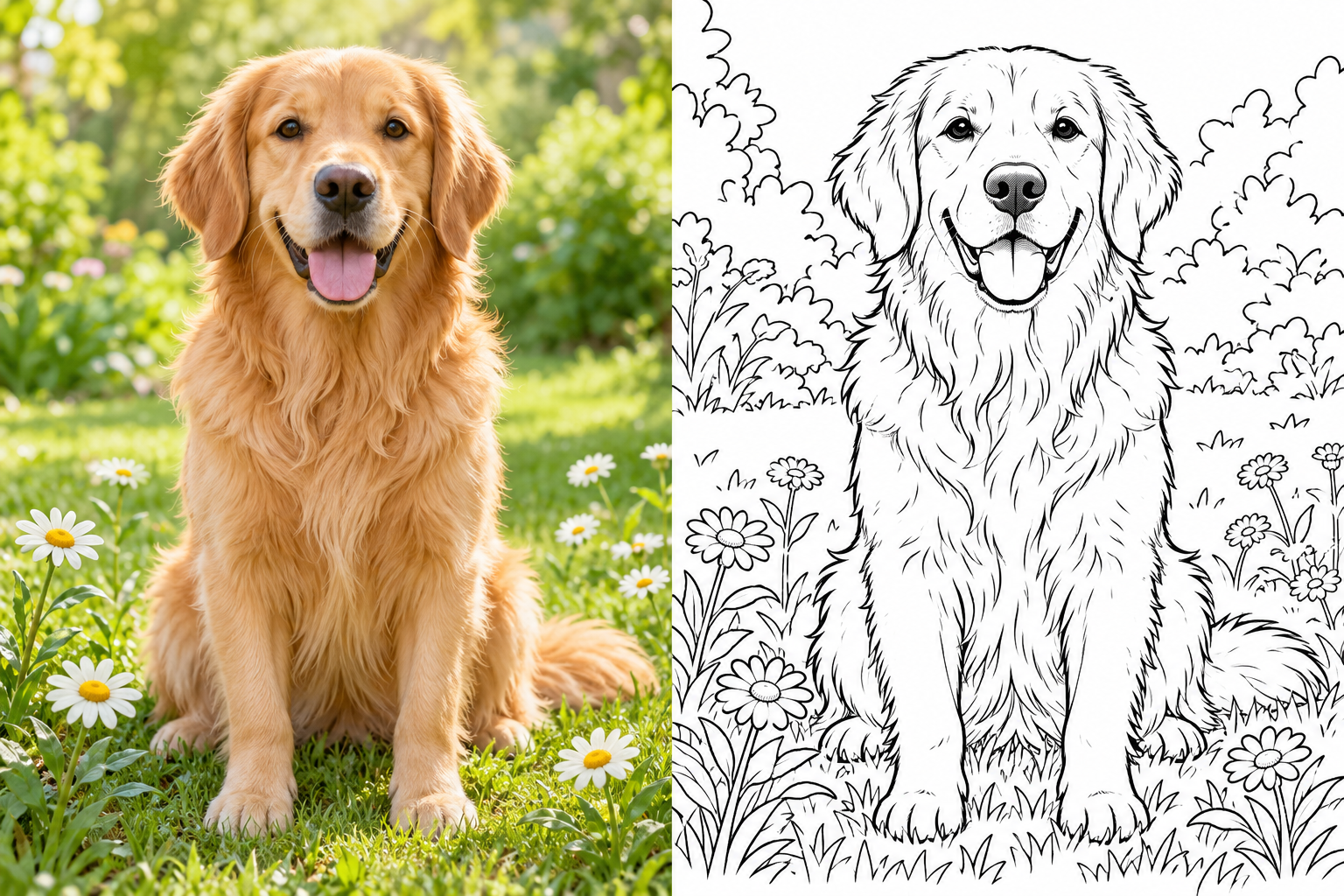
An example, ready to print
The original photoA new coloring adventure

How to turn a photo into a coloring page

Start with a favorite photo. Choose how much detail to keep, then download a page you can color on paper.

  1. Choose your photo

    Upload a clear photo of a person, pet, or place. A distinct subject and a simple background give the AI less clutter to turn into lines.

  2. Create the line art

    Sign up and sign in to use your 3 free pages. Choose Simple, Balanced, or Detailed, then start the conversion. The AI redraws your photo as black outlines on a white background. Review the result before printing.

  3. Download and print

    Save the PNG or choose a printable PDF in A4 or US Letter. Match the paper size to your printer, check the print preview, and start coloring.

Choose a photo that is easy to turn into line art

Sharp subjects and even lighting matter more than filters. A little cropping can leave more space for coloring.

Portraits

  • Use a face in focus with visible eyes and an even light source. Deep shadows can hide the features you want to keep.
  • Choose a plain background. Busy wallpaper, crowds, and objects behind the head can add unwanted outlines.
  • Crop to the head and shoulders, or leave room around a full-body pose. Avoid cutting through the face, hands, or feet.

Pets

  • Pick a still, well-lit pose where the eyes, nose, ears, and body outline are easy to see. Motion blur can merge these features.
  • Look for contrast between fur and the background. A dark pet against a dark sofa is harder to separate into clear shapes.
  • Start with Simple or Balanced for fluffy fur. Detailed can turn lots of small hairs into crowded areas that are difficult to color.

Landscapes

  • Choose an obvious subject, such as a house, mountain, or large tree. Distant objects may become too small to color on a printed page.
  • Scenes with separate sky, land, and foreground shapes leave useful coloring areas. A clear horizon helps organize the picture.
  • Use Simple for dense foliage or city scenes. Choose Detailed when you want to spend time on smaller leaves, windows, and patterns.

What makes a good coloring page?

A useful page balances recognizable shapes with enough white space to fill. Judge it at the size you plan to print.

Clear, readable outlines

Outlines around 1–2 pt at the final printed size are a useful starting point. Very fine lines below about 0.5 pt can be hard to see; very heavy lines can swallow small features. Check the eyes, fingers, and edges in the print preview.

Open spaces for coloring

Look for closed shapes with room for a crayon or pencil tip. Large areas and a mostly white background are easier to fill. If fur, grass, or shadows create a tangle of lines, try a simpler photo or less detail.

Detail that suits the activity

Simple favors larger shapes for a short activity or younger colorers. Balanced keeps more recognizable features. Detailed adds smaller areas for people who enjoy careful pencil work. A busy photo may still need a tighter crop.

The detail setting guides the AI; it does not set an exact line width. AI can reinterpret small features, so inspect the generated page before you print it.

Frequently asked questions

Can I turn a photo into a coloring page for free?

Yes. Create an account and sign in for a one-time trial of 3 successful coloring pages. The trial does not reset each day. Paid plans provide a finite monthly credit allowance for more pages; downloads do not use extra credits.

Do I need to create an account?

Yes. You must create an account and sign in before generating a coloring page, including the free trial. Each account has 3 successful trial pages in total across all tools. Signing out, switching browsers or changing tools does not reset the allowance.

Which photos work best for coloring pages?

Choose a sharp photo with even lighting, a clear main subject, and a simple background. Portraits with visible facial features, still pet photos, and landscapes with large distinct shapes are good starting points. Blurred photos, deep shadows, and busy backgrounds can produce crowded or unclear outlines.

Can I download a printable PDF?

Yes. A generated page can be downloaded as a PNG image or a printable PDF in A4 or US Letter. Select the paper size that matches your printer and check its print preview for clipping. You can download your available result again without spending more credits.

How do I choose between Simple, Balanced, and Detailed?

Choose Simple for larger coloring areas and fewer small lines. Balanced is a starting point when you want recognizable features without too much texture. Choose Detailed for smaller shapes and longer coloring sessions. The setting guides the AI rather than controlling an exact number of lines.

Do you store my original photo?

Original photo bytes are not saved in our database. A resized photo is temporarily uploaded to KIE for photo checks and generation. KIE and its model providers process the photo under their own retention policies. Generated coloring pages are saved in your account for private preview and downloads. Read our Privacy Policy before uploading.

How long are my coloring pages available?

Generated coloring pages are saved in your account until you delete them. Sign in to preview or download your saved pages. Downloading an existing page does not use another trial page or extra credits.

Why can the coloring page look different from my photo?

The AI redraws the photo as line art rather than tracing every pixel. Small facial features, fur, shadows, and background textures can change. Try a clearer photo, a tighter crop, or a simpler detail level if the result is too busy. Each successful new generation counts toward your trial or paid allowance.